Categories
Music Technology

Sony’s Speaker Ball Is Music to your Ears

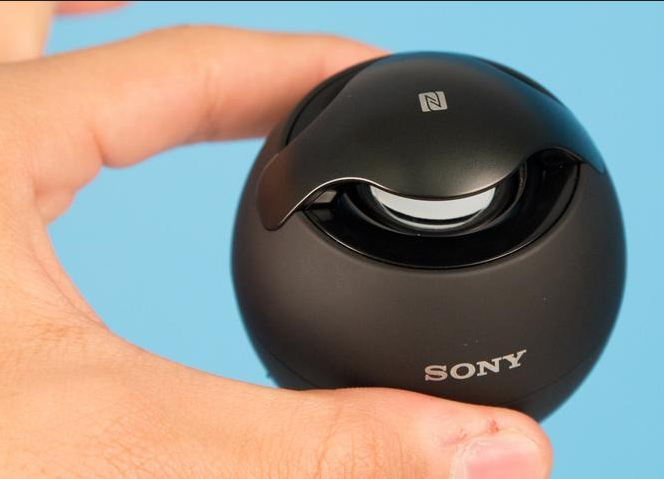
Part of a growing trend among accessories, Sony’s egg is equipped with NFC (near-field communication) for instant pairing with any NFC phone. That includes almost all top-line Android models, including Sony’s as well as franchise players such as the Samsung Galaxy S4 and HTC One, but not the iPhone.

To pair, just enable NFC through the phone’s settings and hold it over the top “bridge” over the driver, where the NFC tag sits. This will immediately links the phone with the speaker via Bluetooth. Those without NFC phones can fall back to the plain old Bluetooth pairing, which is hardly cumbersome, but still complicated enough that it prevents many from ever using it. There’s also a mini-jack input for a hard-wire connection.

About the size of a tennis ball, the Sony SRS-BTV5 is a wireless speaker that can pair with your phone via NFC — meaning all it takes is a touch. It delivers good sound for the price: $69.99

Categories
Education Technology

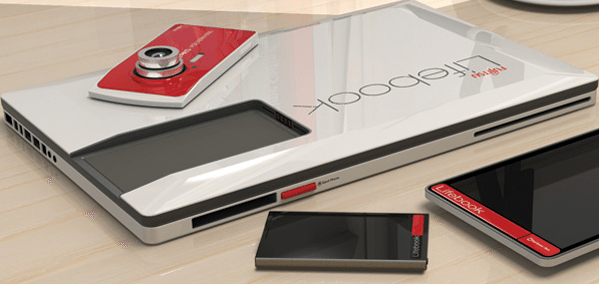
Fujitsu Lifebook 2013 Concept Incorporates a Tablet, Keyboard, Phone and Camera

The Fujitsu laptop concept, that also incorporates a tablet, phone and camera. Dubbed the Lifebook and seen as a concept from 2013, this original unit is what they call a modular device.

You can detach its camera and use it as a digital camera, detach the tablet and use it as such or attach it and use it as the laptop’s keyboard or touch drawing area. There’s also a phone that you can insert into a special area and I guess that this device incorporates the CPU and storage space used by the laptop. The Fujitsu laptop may be bulky, but it’s still an interesting and original design you might want to keep an eye on.

I particularly like the idea of having both a tablet and a laptop in a single gadget and connected through a 16 pin docking area. Data is available right away and the device is sensed immediately, also adding some new features to the laptop.

Categories
Technology

Scientists Create Bionic Ear More Powerful than Human Ear

Scientists at Princeton University have designed a bionic ear that can hear better than human ears. And get this: It was printed using an off-the-shelf 3D printer.

We’ve heard of 3D printers someday building human organs before, but what’s noteworthy about this project is this printed ear intertwines embedded electronics. These Princeton researchers basically 3D-printed cells and nanoparticles, and then combined a small coil antenna with cartilage to create this “bionic” ear, according to the university.

The result was a fully-functional organ that can hear radio frequencies a million times higher than our human ears, lead researcher Michael McAlpine told Mashable.

“The way that our ear hears now is we pick up acoustic signals and then we convert those into electrical signals that go to our brain,” said McAlpine, who is an assistant professor of mechanical and aerospace engineering at Princeton. “What this ear does is it has this electronic coil on it and it picks up electronic signals directly.”

Categories
Education Technology

500 Budding Teen Techs Learn How to Code

An AppDay mentor helps out a budding coder with her programming skills.

It’s no secret that Washington is falling behind when it comes to educating our future techs. While the state ranks fourth in the nation for tech-related companies, Washington comes in a disappointing 46th for participation in science and engineering graduate programs.

Which makes what happened on Thursday inside the gymnasium of Rainier Beach High School all the more special.


h/t – GW

Categories
Entertainment Technology

The New Wave – Tabletop PCs

This new category of PC can be hard to pin down. To some, these are all-in-one desktops, similar to the Apple iMac, but with the added ability to either fold down flat or detach their screens. To others, these are battery-powered megatablets, with screens measuring between 18 and 27 inches, but are otherwise similar to Windows 8 slates such as Microsoft’s Surface Pro. But, I think they’re an entirely different animal, with features of a personal computer, a piece of consumer electronics equipment, and even living-room furniture.

None of the early examples are quite ready for broad mainstream audiences yet, but of these, the 18-inch Dell XPS 18 is thin and light, and it’s the easiest to carry around, while the Lenovo Horizon is the most ambitious, with a giant 27-inch display, custom software interface, and a small collection of included accessories for tabletop gaming.


Lenovo IdeaCentre Horizon 27 

Sony Vaio Tap 20 

Asus Transformer AIO 

Dell XPS 18 

h/t – CNET
Categories
Technology

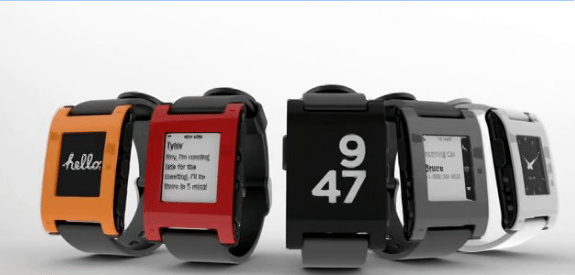
Pebble E-Paper Watch for iPhone and Android

CUSTOMIZE YOUR PERFECT WATCH. IT’S AS EASY AS DOWNLOADING AN APP.

Pebble is the first watch built for the 21st century. It’s infinitely customizable, with beautiful downloadable watchfaces and useful internet-connected apps. Pebble connects to iPhone and Android smartphones using Bluetooth, alerting you with a silent vibration to incoming calls, emails and messages. While designing Pebble, we strove to create a minimalist yet fashionable product that seamlessly blends into everyday life.

CUSTOMIZE WITH APPS.

Apps bring Pebble to life. We’re building some amazing apps for Pebble. Cyclists can use Pebble as a bike computer, accessing the GPS on your smartphone to display speed, distance and pace data. Runners get a similar set of data displayed on their wrist. Use the music control app to play, pause or skip tracks on your phone with the touch of a button. If you’re a golfer, feel free to bring Pebble onto the course. We’re working withFreecaddie to create a great golf rangefinder app for Pebble that works on over 25,000 courses world-wide. Instead of using your phone, view your current distance to the green right on your wrist. These apps will be the first, with more in the works!

CYCLING

CONTROL YOUR MUSIC

RUNNING

GOLF RANGEFINDER

Pebble can change instantly, thanks to its brilliant, outdoor-readable electronic-paper (e-paper) display. We’ve designed tons of watchfaces already, with more coming every day. Choose your favourite watchfaces using Pebble’s iPhone or Android app. Then as the day progresses, effortlessly switch to the one that matches your mood, activity or outfit

BEAUTIFUL WATCHFACES

CUSTOMIZE WITH NOTIFICATIONS.

If you need to stay on top of things, Pebble can help with vibrating notifications, messages and alerts. Dismiss a notification with a shake of your wrist. Don’t worry, it’s easy to disable all notifications.

  • Incoming Caller ID
  • Email (Gmail or any IMAP email account)
  • SMS on both Android and iPhones
  • iMessage (iOS only)
  • Calendar Alerts
  • Facebook Messages
  • Twitter
  • Weather Alerts
  • Silent vibrating alarm and timer

Watch Video

Categories
Technology

Canon’s PowerShot N: A Compact Camera That Does Instagram One Better

Canon had a number of new cameras on display at CES 2013 this year, but the most noteworthy of all was the PowerShot N, a new ultracompact shooter that’s only about 3 inches by 2 and half, and only 1.2 inches deep. It’s almost square, which makes it resemble the camera depicted in the Instagram icon on the iOS and Android app, and once you use it, you realize the connection probably isn’t entirely accidental.

The PowerShot N is designed entirely around one-handed use, a Canon rep explained, with a touchscreen based interface that generally takes care of most things for you, including even selecting a filter, should you choose. Whereas with Instagram you still have to do some kind of creative input, the Canon rep explained, the Canon PowerShot N on full auto will choose the best filter for your situation. It’ll give you a different one for a sunset landscape vs. an indoor portrait, for example. The camera can also create five different filtered versions of each shot in a new creative mode to let you pick the best.

The PowerShot N still offers a lot of creative control, with shutter and zoom manual ring controls on the lens, which borrows a trick from the PowerShot S100 series of more pro-oriented compacts. It has a 12-megapixel sensor, and improved Wi-Fi connectivity with a new button that allows you to get it connected to the CameraWindow app for iOS and Android with a single click. The camera has a battery good for around 280 shots, with Canon’s new eco-drive, which should add 30 percent more battery by managing power.

Categories
Technology

Make Free Calls from iPhone With The Official Google Voice App

If you’re a long-time Gmail user, you no doubt know about and/or use Google Voice — a free web-based platform that provides users with an online phone number for making calls online via an Android, BlackBerry, and now the iPhone. If you don’t have a Google Voice number set up, you’re missing out on a very useful contact tool. Check out Ryan Dube’s 5 Cool Things You Can Do With Google Voice for more details.

I’ve been using my Google Voice (GV) number primarily as a second contact number for which family and friends can reach me when I’m a way from my phone and working on my computer. I also post the number on trusted website forums and registrations.
For a few months in 2009, a third-party Google Voice app was available for the iPhone, but Apple decided to remove it along with the official Google Voice app that was released a few months later. But now, the official app is back and available for free in the App Store.


Categories
Technology

Facebook Loses 1.4 million UK Visitors in a MONTH as Users Switch Social Media

The number of people using Facebook is plummeting, with 1.4million British users logging off in just one month.

Despite being the world’s largest social network with more than a billion users, people in Facebook’s biggest markets are deleting their accounts.

In the last month there has been a 4.5 per cent fall in British users, according to independent data.

Users in Facebook’s biggest markets are deleting their accounts and swapping to newer social media

In the last six months, Facebook has lost nearly 9 million monthly visitors in the US and 2 million in the UK.

Experts say as new social media sites grow, Facebook’s users are deserting the network.

They say that figures aren’t helped by the lack of new Facebook members. It is believed that most people who want to sign up to the site have already done so.

New media specialist Ian Maude said the fall in numbers was due to ‘a boredom factor’.

It is believed there is stagnation as most people who want to join the site have already done so

‘The problem is that, in the US and UK, most people who want to sign up for Facebook have already done it.

‘People like to try something new. Is Facebook going to go the way of Myspace?

‘The risk is relatively small, but that is not to say it isn’t there.’

Facebook Founder Mark Zuckerberg is said to be introducing new features in order to win members back.

The company is working to appeal to younger Smartphone users.

The most significant development is Facebook Home, software that can be downloaded on to certain Android phones to feed news and photos from friends – and advertising – directly to the owner’s locked home screen.

As well as switching off from the network, Facebook users are reported to be spending less time on the site.

The number of minutes spent on Facebook in the U.S has fallen.

The average dropped from 121 minutes in December 2012, to 115 minutes in February, according to comScore.

But Facebook explained that the time spent on its pages from those sitting in front of personal computers is declining rapidly because we are switching our screen time to smartphones and tablets.

Read more: http://www.dailymail.co.uk/news/article-2316447/Facebook-loses-1-4million-UK-visitors-MONTH.html#ixzz2Rsy8MSO8

Categories
Entertainment Technology

Games You Should Be Playing: Candy Crush Saga


So, you haven’t bought into the Candy Crush Saga craze yet, have you? Well, maybe you should because this match-3 game is seriously addictive, just like candy!

It is unlike any other match-3 game I have ever played and surpasses the likes of Bejeweled and others of its kind. The king.com creators of this game has made a unique twist out of a simple concept that leaves your sweet tooth wanting more.

Yes, you do have to match-3, but it doesn’t end there. You have to match 4 and up to get special booster candies and then you can combine those booster candies to make big happenings in order to beat the game levels and move on up the candy ladder.

But of course, it can never just be so easy. As you get higher up in the ranks, the challenges become more involved with layers of jellies, gates, and blobs of chocolates getting in the way. I swear those chocolates drive me crazy. Some levels you have to fill out orders, recipes, combos, clear the board of jellies, and/or achieve a target score.

This game can be really difficult and challenging to the point where there will be times when you just want to pull your hair out and give up, but you won’t because no way you’re going to let some sweet treats beat you down like that.

There’s also a social aspect to the game where you can connect your Candy Crush to Facebook. I highly recommend doing this because Facebook saves your progress which is helpful in case you ever have to reinstall your game or need to play the game on somewhere other than your original device. You also need your Facebook friends to send you extra lives and tickets. Tickets are needed to move forward to the next episodes.

The one big negative about this game though is they want you to pay for extra features such as more lives, moves, boosters, etc.

I paid $0.99 one time for extra lives. Never again.

Now, I know how to get unlimited lives and the Facebook integration comes in handy for that tip. So, you can definitely beat the game without buying any extras if you keep at it and learn the ins and outs of making a successful Sugar Crush level completion.

Right now, I’m on Level 169 and it’s kicking my butt hard-core. I’ve been stuck on this level for 2 weeks and it’s driving me crazy, but I will not give up. I most beat those chocolates!!

You can download and play Candy Crush Saga on any Android or iPhone device by use of Google Play or the Apple App Store or you can play it on Facebook.

Candy Crush is a deliciously sweet addictive game that you must give a try.

Happy Gaming!!

Categories
Technology

Electrified Specialized Turbo Makes Cycling as Easy as Driving

The last time I’d found myself astride an electric bike was over four years ago, when CNET reviewed the Schwinn Tailwind in March of 2009. That bike was jerky and awkward, very heavy, and a bit of an eyesore.

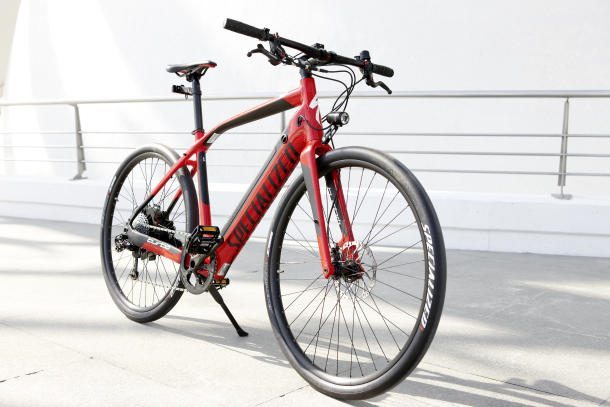
Fast-forward just under half a decade to April 2013, when I find myself standing in front of the sleek, red frame of the new Specialized Turbo. Electric bike, you’ve come a long way, baby.

Design
The Specialized Turbo is a good-looking bike. Period. And I don’t just mean “good for an electric bike.”

The bike blends road/racing bike looks with commuter bike proportions. It looks fast but rides comfortably. For example, the top tube slopes downward as it sweeps back from the front of the bike, flowing smoothly into the rear triangle seat stays, but more importantly freeing up valuable crotch space and stand-over clearance when stopped and straddling the bike.

The straight handlebars are your first hint that this bike and its upright riding position is best suited for a race to the office rather than to a finish line. On this bar, you’ll find an SRAM DoubleTap thumb shifter for clicking through the Turbo’s 10-forward gears, brake levers, a cycling computer, and thumb controls for the e-assist system, which we’ll get back to in a bit.

At the front and rear ends, you’ll find lightweight 700c wheels shod in low-rolling resistance tires that have an odd, smooth finish that makes them look a bit like naked inner-tubes to my eye. The Turbo hauls itself to a stop with front and rear disc brakes and, at its most basic, gains forward propulsion from your legs spinning the cranks.

The cables for the rear derailleur and brakes are routed through the frame for a smooth appearance and snag-free operation. As are the cables for the battery pack and e-assist system. Speaking of which, where is that battery pack?

Turbo electric assist system

Take a close look at the Specialized Turbo and you’ll see that the downtube — that’s the one that angles down from the front of the bike towards the pedals — is significantly thicker than the other tubes that make up the frame. That’s because the downtube houses the 342Wh (watt-hour) battery pack.

The cylindrical battery is locked into place and can be removed from the bike with a key. You have two options for charging the battery.

The first is on-bike charging, achieved by removing a magnetic cap from the downtube and connecting a proprietary charging cable directly to the bike. This is good for times when you can bring the entire bike indoors, such as your own dwelling at night.

The second option is to remove the battery from the bike and plug the charger directly into the cylindrical pack with the same cable. This is good for times when you can’t bring the whole bike with you — for example, the bike can stay in a secure bike room at the office while the battery charges at your desk.

Both charging options take about four hours to top off a completely drained battery.

Power from the battery pack is sent to a hub motor on the rear axle that provides electric assist when it senses that you, the rider, are pedaling forward. Specialized kept repeating that the Turbo was supposed to feel like “you, only better” — the idea being that the electric assist gives the sensation of the cyclist being just a bit stronger than he or she actually is, sort of like a good tailwind or a slight downhill incline.

The rider is given the choice between four electric assist modes. In Turbo mode, the electric motor gives its full 250 watts of available assistance. Eco mode reduces that output to about 30 percent, or about 75 watts, for increased range. There’s a No-assist mode that lets your legs supply 100 percent of the forward thrust. Finally, in Re-gen mode, the electric motor applies drag to the rear wheel to help recharge the batteries. You do not want to be riding around in Re-gen mode unless you’re coasting down a long hill. Applying the rear brake automatically shifts the bike into Re-gen mode until you release the lever.

Specialized assured me that the electric system is completely waterproof and will work in subzero climates and at triple-digit temperatures. In a word, this bike should be safe. Just wear your helmet and keep your head on a swivel.

How far the electric assist will last you is a bit tricky to explain.

On the road

Explaining the Turbo’s range is a bit tricky because of that specific “electric-assist” bit of nomenclature. You see, the bike never really runs on 100 percent electric power. The rider is always supplying a portion of the forward thrust — part of that whole “you, only better” mantra. So the range you’ll get from the Turbo’s battery pack depends on a number of factors, from your leg strength to your gear selection out of the 10 available, to the amount of coasting or climbing that you encounter. Specialized tells me that you’ll get about an hour’s worth of cycling, but the number of miles that you can cover in those 60 minutes will vary.

The Turbo has an estimated full-assisted top speed of 27 mph, so let’s assume that on a perfectly flat road with no stops, you could eke 27 miles out of the battery. My testing took place on an approximately 11.7 mile loop, starting on San Francisco’s Embarcadero, taking us through a fast blast through the Marina district and over a pretty serious climb near the Golden Gate bridge. It used 62 percent of the battery, which seems to back up that range estimate.

Once the battery runs out, the Turbo reverts to being a standard leg-powered bicycle, so technically the range is limited only by your physical fitness.

Specialized has done a pretty good job of making the electric assist mostly seamless once you’re moving, but I ran into a bit of unsteady lurching when attempting to mount or dismount at traffic lights. The bike never felt dangerous, or like it was getting away from me, but the sensation took some getting used to. I’d recommend that any cyclist do their first few starts in Eco mode, familiarizing themselves with the bike before blasting off with the full Turbo.

Track stands at stop lights are difficult, but not impossible. Thanks to the electric assist, however, highly technical moves like this are more a matter of finesse than leg strength.

Once underway, the Turbo is a revelation. The way that the bike accelerates and holds speed is, frankly, unbelievable. Our demonstration group was flying past spandex-clad cyclists hunched over their road bikes without breaking a sweat, in an upright position, and in relative comfort. My personal top speed of 24.8 mph was just below the stated maximum 27 mph. Hills were a non-issue and, to a degree, so was gear selection. With the full support of the Turbo mode’s assist, pulling away from a stop in top gear was just as easy as it was in first gear. Gear selection became more of a range conservation and comfort concern than a necessity for maintaining speed.

The disc brakes slowed the bike quickly when necessary, and though I had my reservations about the smooth tires, the bike was nimble enough to carve city corners and weave through traffic with nary a slip — although I would still still be leary of the slick trolley track and embedded Muni train tracks embedded in San Francisco’s downtown streets.

More important than the outright speed was the effortlessness that the electric assistance afforded. I ride my bike to work almost every day, and almost every day I show up damp with perspiration. I was amazed to find that after an 11-plus mile ride at an average speed of just over 14 mph, I’d not even broken a sweat.

San Francisco is a town known for its hills, but the Specialized Turbo doesn’t care about hills. It allows any rider to make up for fitness deficiencies while still getting some of the fitness benefits of riding a bike — not to mention the fuel savings and sanity savings of not having to find a parking spot in a crowded urban environment. I could definitely see myself riding one of these to work and around town daily.

What’s the catch?

However, the Turbo isn’t without its drawbacks. For starters, the thing weighs 50 pounds. Specialized itself admits that this is a hefty bit of kit, but in a sizzle reel that preceded our ride, showed a guy carrying the Turbo down stairs. Call me lazy, but I would not want to shoulder this thing up or down three flights of stairs like I do with my current bike — itself no featherweight at about 22 pounds.

Fortunately, once both wheels are on the ground, the electric assist more than makes up for the heavyweight, and you won’t really feel the bike’s mass unless you go trying to bunny hop curbs.

The other issue is the price. At $5,900, this bike is an expensive purchase and is targeted at a very specific niche of bicycle commuters who can afford to spend a lot of money on a bicycle and don’t mind doing so.

Now, I know a lot of guys and gals who ride around on $200 bikes who would gasp at paying that much for a set of wheels, but I also know people who commute into work on $4,000 carbon-fiber race bicycles. So whether the Turbo is overpriced or not is highly subjective. I’m sure that there are a number of potential riders who would like to be able to ride more, who have the disposable income of the spandex set, but perhaps aren’t as physically fit or willing to shower at the office.

Here’s how I look at it. In a densely packed city like San Francisco, a bike isn’t just a bike. For many riders, a bike is also a reasonable replacement for a car. It’s not hard to put myself in those shoes, because they are my shoes. Spending $15,000-plus on a compact car that brings with it the headaches of parking and paying for fuel versus springing $6,000 for a damn fine electric bike that could get me anywhere I’m going just as fast, if not faster is not a tough choice. Living in a city like SF, I have to say I’d pick the bike.

Categories
Technology

Customized iPhone 5 Case + Free Global Shipping

Use Your Own Photos to Create a One-of-a-Kind Case!

Casetagram is a revolutionary design service that lets you create custom cases for your mobile devices from your Instagram and/or Facebook photos.If you’ve been hunting for a truly unique way to customize your iPhone 5 then look no further because with this exclusive promotion you’ll be able to fully customize a case with all of your special photos.
It even gets better…you’ll even receive a screen protector [$20 value] for your mobile device with this purchase.

 More Info

Exit mobile version